This bundle curates essential items for a minimalist home office, focusing on productivity and an uncluttered aesthetic. It's designed for professionals and enthusiasts seeking to optimize their workspace for efficiency and comfort. The products collectively help create a functional, visually appealing, and organized work environment.
Curated by Signal & Noise · Updated June 2026
Built for remote professionals who need to eliminate glare and eye strain during late-night sessions without cluttering a small desk surface. Not for gamers who want RGB saturation; this shop focuses on functional neutral lighting and tactile ergonomics.
Curator's pick: BenQ ScreenBar Halo
Most monitor lights have poor counterweight designs that wobble, but the Halo's clamp actually stays put on curved displays, and the wireless dial is the only one I've used that doesn't lag after six months of daily use.
⚠ Worth knowing: If you use a high-profile webcam, the ScreenBar Halo will likely block it or cause significant lens flare, requiring you to buy a separate offset mount for your camera.
Standing Desk Frames for Cable Management PuristsAcoustic Wall Paneling for Home RecordingUnder-Desk Storage and Organization Hardware
This shop curates essential items for a minimalist home office, focusing on productivity and an uncluttered aesthetic. It draws inspiration from modern workspace optimization, bringing together products that enhance both form and function.
This bundle is ideal for professionals, content creators, and enthusiasts who spend significant time at their desk and prioritize productivity, comfort, and a clean workspace. It's especially suited for those setting up a dedicated home office or upgrading an existing one.
To get started, consider the Ergonomic Desk Chair and Felt Desk Mat to immediately improve comfort and desk protection. A full build, including all items, can range from $845 to $3110 depending on chosen specifications.
Full build
$845–$3110
Starter
$530–$1560
Chair + Mat + ScreenBar
Best forWork From HomeProductivity BoostErgonomic SetupMinimalist AestheticClean DeskContent Creation
The BenQ ScreenBar Halo is a premium monitor light designed to illuminate your workspace without causing screen glare. It's ideal for anyone spending long hours at a desk, reducing eye strain and improving visual comfort. This light helps maintain focus and well-being during extended work sessions.
Sleek LED monitor lamp
Adjustable brightness and color temperature
Wireless remote control included
Symmetrical flicker-free illumination
USB-powered operation
In this shop: The BenQ ScreenBar Halo fits the minimalist home office productivity vibe by offering unobtrusive, high-performance task lighting essential for focus without adding desk clutter.
A Mechanical Custom Keyboard offers a personalized and tactile typing experience, distinguishing it from standard office peripherals. It is for typists, programmers, and gamers who value precise feedback and durability in their input device. This keyboard enhances typing speed and comfort, solving common ergonomic and aesthetic issues.
Durable mechanical key switches
Customizable keycaps and layout
Robust metal or plastic frame
Wired USB-C connectivity
Tactile or linear switch options
In this shop: A Mechanical Custom Keyboard aligns with the minimalist home office productivity vibe by providing a high-quality, personalized input device that is both functional and aesthetically refined.
A Felt Desk Mat provides a soft, non-slip surface for your workspace, protecting your desk and reducing noise from typing or mouse movements. It is suitable for anyone seeking to enhance their desk's aesthetics and tactile experience. This mat solves issues of desk wear, discomfort, and excessive noise.
Soft wool or synthetic felt material
Non-slip backing
Large rectangular surface
Sound dampening properties
Protects desk surface
In this shop: The Felt Desk Mat supports the minimalist home office productivity vibe by adding a soft, textured surface that is both functional and visually unassuming.
An Ergonomic Desk Chair is designed to provide optimal support and comfort during prolonged sitting. It targets office workers and students who spend many hours at their desks, helping to prevent back pain and improve posture. This chair solves the problem of discomfort and potential health issues associated with poor seating.
Adjustable lumbar support
Breathable mesh or fabric upholstery
Swivel and tilt mechanisms
Height-adjustable armrests
Five-star wheeled base
In this shop: The Ergonomic Desk Chair is integral to the minimalist home office productivity vibe, emphasizing sustained comfort and health without sacrificing clean lines.
A Monitor Arm Mount secures your display above the desk surface, freeing up valuable space and allowing for optimal positioning. It is for anyone looking to declutter their desk and achieve better ergonomic monitor placement. This mount solves limitations of fixed monitor stands, enhancing flexibility and workspace aesthetics.
Desk clamp or grommet mounting
Adjustable height and angle
Supports VESA compatible monitors
Cable management system
Single or dual monitor configurations
In this shop: The Monitor Arm Mount contributes to the minimalist home office productivity vibe by decluttering the desk and enabling a floating display, enhancing workspace cleanliness.
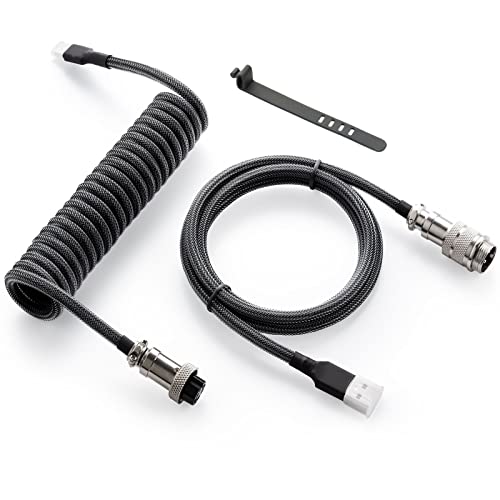
A Coiled USB-C Keyboard Cable is an aesthetic and functional accessory for custom mechanical keyboards, featuring a distinctive coiled design. It is for keyboard enthusiasts who value a clean desk aesthetic and durable, tangle-free connectivity. This cable elevates the visual appeal of a keyboard setup while providing reliable power and data transfer.
Durable braided sleeve
USB-C to USB-A connection
Heat-shrink tubing accents
Detachable aviator connector
Coiled section for flexibility
In this shop: The Coiled USB-C Keyboard Cable perfectly aligns with the minimalist home office productivity vibe by offering a small, visually appealing detail that enhances the overall aesthetic of a custom keyboard.
The combination of a monitor arm, screen bar, and felt mat significantly declutters your desk, creating a more focused and aesthetically pleasing work environment.
Integrating an ergonomic chair and monitor arm ensures proper posture and reduces strain during long work sessions, promoting long-term health and comfort.
The custom keyboard and coiled cable not only enhance typing experience but also add a personalized, high-quality touch that elevates the entire setup's visual appeal.
What to know
The initial investment for a complete setup can be substantial, especially when opting for higher-end ergonomic chairs and custom keyboard components.
Setting up multiple peripherals like a monitor arm and custom keyboard may require some time and attention to detail to achieve optimal positioning and cable management.
How to use this together
1
Start with Ergonomics
Begin by assembling your Ergonomic Desk Chair to establish your primary seating position. Once the chair is adjusted to your height, place the Felt Desk Mat to protect your desk surface and define your immediate workspace. This anchors your setup around comfort and desk protection from the outset.
2
Mount Your Monitor
Next, install the Monitor Arm Mount, securing your display above the desk. This frees up valuable surface area and allows for precise height and angle adjustments. Once the monitor is in place, attach the BenQ ScreenBar Halo to the top of your monitor to provide optimized, glare-free illumination for your entire desk area.
3
Keyboard and Cable Management
Finally, connect your Mechanical Custom Keyboard using the Coiled USB-C Keyboard Cable. Arrange it on the Felt Desk Mat within comfortable reach. The custom cable adds a polished look and helps maintain a tidy, organized desk, completing your minimalist and productive workspace.