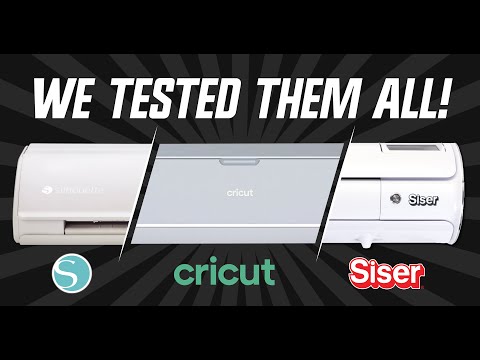
This bundle compares top cutting machines from Siser, Cricut, and Silhouette, alongside their respective software and essential accessories. It's designed for crafters and small business owners who need to understand the differences in performance, software, and ecosystems. The collection helps in identifying which vinyl cutter best suits specific project needs and budget.
Curated by The Shelf Curator · Updated June 2026
Built for professional crafters and small-scale production shops who require high-precision tracking for complex vinyl weed designs. Not for casual hobbyists looking for the cheapest entry point—this shop focuses on hardware with high-torque motors and professional-grade software integration.
Curator's pick: Siser Juliet 12 Inch High Definition Cutter
The Siser Juliet distinguishes itself via a high-definition motor that allows for cutting intricate details that often snag or tear on standard blade systems. Its superior tracking mechanism manages long material rolls more effectively than competitors, making it the industrial choice for high-volume output.
⚠ Worth knowing: High-definition cutters require a steep learning curve with software parameters like offset and force settings; using the wrong pressure on thinner heat-transfer vinyl will ruin the blade and the cutting strip instantly. These machines also demand significant desk real estate for the rear clearance required during large-scale feed cycles.
Vector Design Software for Vinyl ProductionProfessional Grade Heat Presses for ApparelBulk Adhesive Vinyl and Transfer Tape Suppliers
This shop was built from extensive testing and comparisons of the top cutting machines: Siser Juliet, Cricut Maker 3, and Silhouette Cameo 4. It highlights their individual strengths in performance, software ecosystems, and included accessories, providing a clear picture of each machine's capabilities.
This guide is for serious crafters, small business owners, and educators who need to invest in a reliable and efficient cutting machine. Whether you're cutting intricate vinyl designs, fabric, or thicker materials, this collection helps you choose the best tool for your specific projects and production needs.
To approach your budget, consider starting with a machine that fits your core needs, like the Silhouette Cameo 4 and its software for around $250. A full build, exploring the high-definition Siser Juliet and its ecosystem, could range up to $500.
Full build
$250–$500
Starter
$250–$330
Silhouette Cameo 4 + Silhouette Studio
Best forProfessional CraftersSmall BusinessesEducatorsVinyl ProjectsHigh-Volume Production
The Siser Juliet is a professional-grade 12-inch vinyl cutter providing high-definition cutting. It is intended for users who require precision and consistent results for intricate designs and various materials. This machine addresses the need for a reliable, high-performance cutting tool in professional crafting or small business environments.
12-inch cutting width
High-definition cutting precision
Adjustable pinch rollers
Integrated camera for print & cut
Robust stepper motor
In this shop: The Siser Juliet fits the 'Siser Juliet and Cricut and Silhouette Cutting Machines' vibe as the high-performance professional alternative in the comparison.
The Cricut Maker 3 is a versatile smart cutting machine designed for a wide range of crafting projects. It is suitable for serious crafters and hobbyists who need to cut over 300 different materials, from delicate paper to thicker balsa wood. This machine offers speed and material flexibility to bring diverse creative ideas to life.
Cuts over 300 materials
Compatible with Cricut Smart Materials
Adaptive Tool System
Up to 2X faster than Maker 2
Bluetooth wireless technology
In this shop: The Cricut Maker 3 represents the flagship consumer model included in the head-to-head testing for the 'Siser Juliet and Cricut and Silhouette Cutting Machines' vibe.
The Silhouette Cameo 4 is a desktop cutting machine with increased speed and power compared to previous models. It is ideal for crafters and small businesses seeking a machine with versatile cutting capabilities and a user-friendly software interface. This cutter helps users create custom designs from a broad range of materials.
3mm material clearance
Dual Carriage system
Built-in roll feeder
Built-in crosscutter
Auto tool detection
In this shop: The Silhouette Cameo 4 is a main competitor known for its powerful software and dual carriage, fitting the 'Siser Juliet and Cricut and Silhouette Cutting Machines' vibe by offering a strong alternative.
Leonardo Design Studio is the dedicated software suite for operating Siser Juliet cutting machines. It provides design and layout tools for creating projects and sending them to the cutter. This software is for Juliet users who need to fully utilize their machine's capabilities for precise cutting.
Vector design tools
Integrated media library
Cutting parameter controls
Print & Cut functionality
Free with Siser Juliet
In this shop: Leonardo Design Studio Software is the dedicated software used to operate the Siser Juliet cutter, aligning with the 'Siser Juliet and Cricut and Silhouette Cutting Machines' vibe by completing the Siser ecosystem.
Cricut Design Space is the proprietary software platform for Cricut cutting machines. It allows users to design, upload, and cut projects with their Cricut devices. This software is for Cricut owners who need a streamlined interface for personalizing and creating with their machine.
Image library access
Text editing tools
Ready-to-make projects
Cloud-based project storage
Mobile app available
In this shop: Cricut Design Space is the companion software for Cricut machines discussed in the comparison, essential for understanding the Cricut experience within the 'Siser Juliet and Cricut and Silhouette Cutting Machines' vibe.
Silhouette Studio Software is the core design application for Silhouette cutting machines. It offers design creation, editing, and machine control functionalities. This software caters to Silhouette users who require robust design capabilities and flexible control over their cutting projects.
Advanced design tools
Vector creation capability
Font access
PixScan functionality
Upgrade options available
In this shop: Silhouette Studio Software is the design software for Silhouette cutters, often compared for its advanced features, crucial for the 'Siser Juliet and Cricut and Silhouette Cutting Machines' vibe's in-depth software analysis.
The Cricut StandardGrip Machine Mat is an essential accessory designed to secure various materials for cutting on Cricut machines. It features a medium adhesive to hold common materials like cardstock, iron-on, and vinyl securely during the cutting process. This mat is for Cricut users who need reliable material adhesion for successful cuts.
12in x 12in size
Standard adhesive strength
Transparent film cover
Gridded for alignment
Durable, long-lasting material
In this shop: The Cricut StandardGrip Machine Mat is an essential accessory for holding materials during the cutting process, representing a foundational component within the 'Siser Juliet and Cricut and Silhouette Cutting Machines' vibe's practical examination.
You can compare the specific cutting precision and speed across professional-grade and hobbyist machines, ensuring the best fit for your project complexity.
The bundled software for each machine allows you to explore design capabilities and user interfaces before committing, highlighting the differences in each ecosystem.
Understanding the material versatility of each cutter, from delicate paper to balsa wood, helps you select a machine that can grow with your creative ambitions.
What to know
The initial cost can be a significant investment, especially for those new to advanced crafting, requiring careful consideration of your budget and project needs.
Each machine has its own proprietary software and accessories, which means transitioning between systems can be costly and requires a learning curve.
How to use this together
1
Evaluate Your Cutting Needs
Before anything else, identify your primary cutting materials and project types. If you need to cut delicate, intricate designs or thicker materials like balsa wood, the Siser Juliet or Cricut Maker 3 might be more suitable. For general crafting and vinyl, the Silhouette Cameo 4 is a strong contender.
2
Explore Software Ecosystems
Dive into the dedicated software for each machine: Leonardo Design Studio for Siser Juliet, Cricut Design Space for Cricut Maker 3, and Silhouette Studio for Silhouette Cameo 4. Understanding their interfaces and features will greatly influence your user experience and design workflow. Many offer trial versions or extensive online tutorials.
3
Assess Accessory Compatibility
Consider the range and cost of machine-specific accessories like the Cricut StandardGrip Machine Mat. Ensure the machine you choose supports the tools and materials you plan to use most frequently, as these can add to the overall investment and impact your project capabilities.
4
Start with a Starter Project
Once you've chosen a machine, begin with a simple project to familiarize yourself with its operation, software, and material handling. This will help you understand calibration, pressure settings, and common troubleshooting, building confidence before tackling more complex designs.